
In This Article
I was sitting in a café in Ubud, Bali, staring at my third abandoned journal in six months. Each one left behind in a different city, filled with maybe a week of entries before life got busy and I “forgot” to write.
The problem wasn’t my commitment to journaling. It was the medium.
Paper journals don’t work when you’re constantly moving. I needed something I could access from my phone during a quiet morning, from my laptop when inspiration struck at midnight, or from a tablet while waiting for a flight. I needed my journal to actually travel with me instead of gathering dust in some forgotten drawer.
That’s when I built my first Notion journal template.
It took some experimenting to figure out what actually worked – what made me want to come back day after day instead of abandoning it like all the paper journals before. But once I found the right structure, something shifted. My practice became consistent for the first time in years.
If you’re here, you’re probably trying to figure out the same thing: how do you set up a Notion journal template that you’ll actually use? One that gives you enough structure to be helpful but enough freedom to feel authentic?
Let me show you what I’ve learned.
I needed something I could access from my phone during a quiet morning at a co-working space, from my laptop when inspiration struck at midnight, or from a tablet while waiting for a flight. I needed my journal to travel with me, not weigh down my backpack.
That’s when I discovered Notion for journaling. Once I figured out the right setup – the one that actually made me want to write instead of procrastinate – everything changed.

Why Use Notion as Your Journal?
Before we dive into creating the perfect template, let me tell you why Notion works so beautifully for journaling:
It’s accessible everywhere. Your journal syncs across all devices. Whether you’re on your phone, laptop, or tablet, your entries are always with you. No more “I forgot my journal at home” excuses.
It’s searchable. Remember that insight you had three months ago about boundaries? Just search for it. No flipping through pages trying to find that one entry.
It’s structured but flexible. You can create as much or as little structure as you need. Some days you want guided prompts, other days you just want to brain dump. Notion handles both.
It’s free. Unlike fancy journaling apps with monthly subscriptions, Notion’s personal plan gives you everything you need at no cost.
You can track patterns. With properties like mood tracking or tags, you start to see patterns in your emotional landscape. When do you feel most grounded? What triggers overwhelm? The data tells a story.
What Makes a Great Notion Journal Template?
Not all Notion journal templates are created equal. After years of journaling and helping others build their own practices, I’ve noticed that the best Notion journal templates share these essential elements:
A clear structure that doesn’t feel rigid. You want guidance without constraint. Templates that give you prompts but don’t make you feel like you’re filling out a form.
Multiple entry types. Daily entries are great, but sometimes you need a weekly reflection or a monthly review. The best systems accommodate different rhythms.
Mood or feeling tracking. This is where digital journaling shines. Being able to tag your emotional state and see patterns over time provides insights that paper journaling simply can’t match.
Organized views. You should be able to see all your entries, filter by specific types (like gratitude entries or self-discovery moments), view them on a calendar, and quickly access recent reflections.
Prompts that invite depth. Generic questions like “How was your day?” don’t cut it. You want prompts that make you pause and actually reflect on what matters.

30 Daily Journal Prompts to Deepen Your Practice
Here are thirty prompts you can use in any Notion journal template. These are organized by purpose, so you can rotate through them, choose the ones that resonate, or use them as inspiration for your own questions.
Morning Reflection (Start Your Day with Intention)
- What’s one thing I want to focus on today?
- How do I want to feel by the end of today?
- What would make today feel meaningful?
- What am I carrying from yesterday that I need to release?
- If today were a blank canvas, what would I paint?
Gratitude (Cultivate Appreciation)
- What’s something small that brought me joy recently?
- Who in my life am I grateful for right now, and why?
- What’s a challenge I’m grateful for because of what it taught me?
- What part of my daily routine am I taking for granted?
- What did my body do for me today that I haven’t acknowledged?
Self-Discovery (Know Yourself Better)
- When did I feel most like myself today?
- What did I do today that aligned with my values?
- What did I do today that didn’t align with my values?
- What patterns am I noticing in my reactions lately?
- If I could tell my younger self one thing based on today, what would it be?
Processing Emotions (Make Sense of Your Inner World)
- What emotion am I avoiding right now?
- What made me feel alive today?
- Where in my body am I holding tension, and what might it be telling me?
- What’s something I’m proud of myself for today?
- What do I need to forgive myself for?
Growth & Learning (Extract Wisdom from Experience)
- What challenged me today, and what did it teach me?
- What assumption did I question today?
- What’s one way I grew today, even if it was uncomfortable?
- What feedback (from others or from life) am I resisting?
- If I approached this situation with more compassion, what would change?
Evening Reflection (Close Your Day Consciously)
- What’s one moment from today I want to remember?
- What drained my energy today, and what filled it?
- If I could redo one moment from today, what would I do differently?
- What am I ready to let go of as I move into tomorrow?
- What does my inner voice want me to know right now?
How to Use These Prompts in Your Notion Journal Template
Here’s the beautiful thing about any Notion journal template: you don’t need a fancy setup to start using these prompts. Let me show you two approaches.
The Simple Way (No Template Needed)
If you already have a journal database in Notion, you can incorporate these prompts by simply creating a new page whenever inspiration strikes:
- Open your journal database
- Click “New” to create a new entry (don’t use a template)
- Choose one prompt from the list above
- Write the prompt as your page title or first line
- Let your thoughts flow
This approach works beautifully when you want variety. Maybe Monday you need a gratitude prompt, Wednesday calls for emotional processing, and Friday you’re ready for self-discovery. Just pick what speaks to you.
The Structured Way (With Templates)
For a more organized practice, you can create a daily template that includes 3-5 rotating prompts. This gives you consistency while still offering depth. I’ll show you exactly how this looks in the next section.
Breaking Down an Effective Template: The Daily Reflection Journal
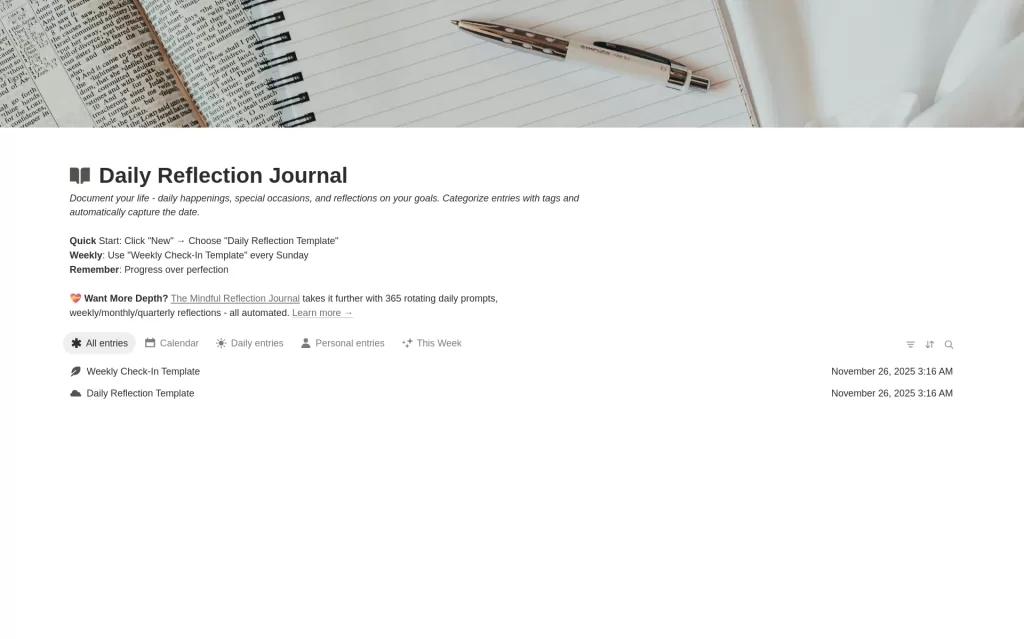
Let me show you what a well-designed Notion journal actually looks like in practice. I created free Daily Reflection Journal as an enhanced version of Notion’s basic journal template, adding the psychological depth I wished I’d had when I first started.
Here’s what makes it work:
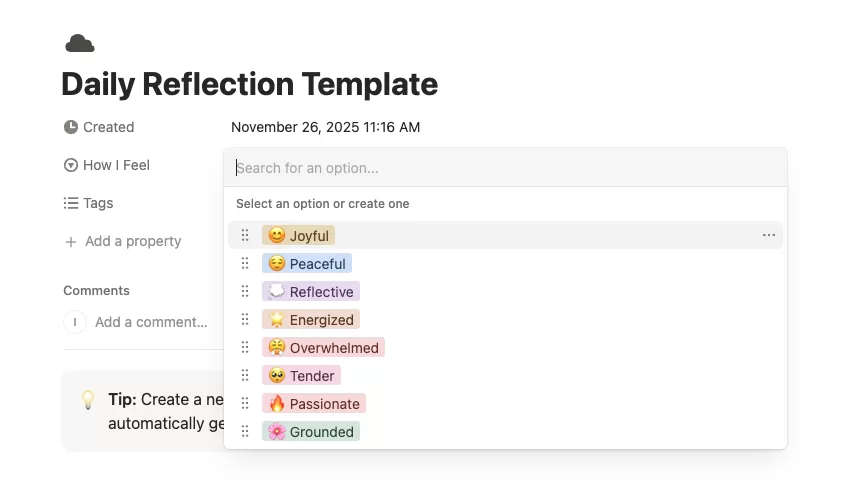
The Mood Tracker
Instead of just writing how you feel, you can tag your emotional state with eight options: 😊 Joyful, 😌 Peaceful, 💭 Reflective, 🌟 Energized, 😤 Overwhelmed, 🥺 Tender, 🔥 Passionate, or 🌸 Grounded. Each one is color-coded, so when you look back at your entries over time, you start to see patterns. Maybe you notice you feel most grounded on Sundays, or that overwhelm hits every Wednesday afternoon.
This awareness is gold. You can’t shift patterns you don’t see.
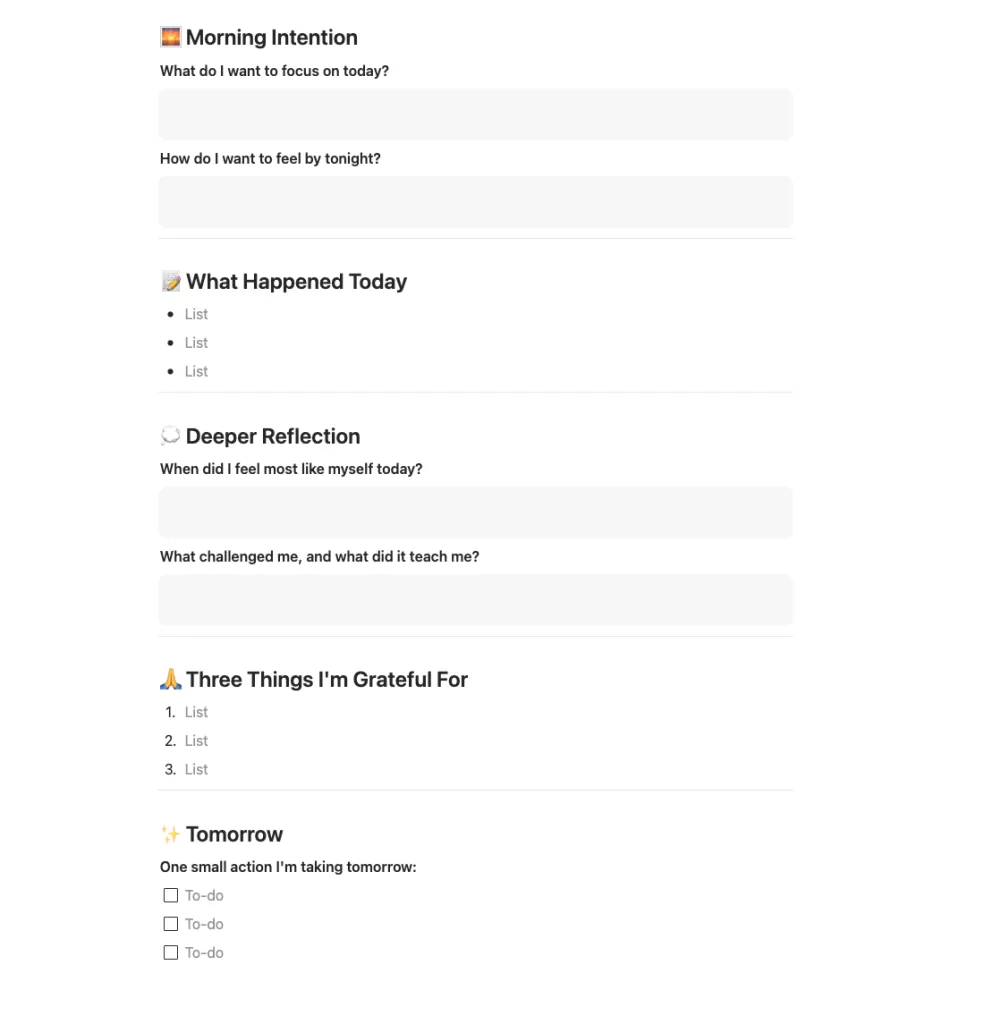
The Daily Entry Template
The template includes structured prompts that take you through a complete reflection cycle:
Morning Intention: Two quick questions to set your focus and desired emotional state for the day.
What Happened Today: Simple bullet points capturing the events, conversations, or moments that mattered.
Deeper Reflection: This is where the magic happens. Two questions invite you to explore when you felt most authentic and what challenged you (and what it taught you). These questions consistently surface insights that surface-level journaling misses.
Three Gratitudes: Not just “I’m grateful for coffee” but specific, felt appreciations that ground you in what’s working.
Tomorrow’s Action: One thing. Not five goals, not a massive to-do list. Just one intentional action to carry forward.
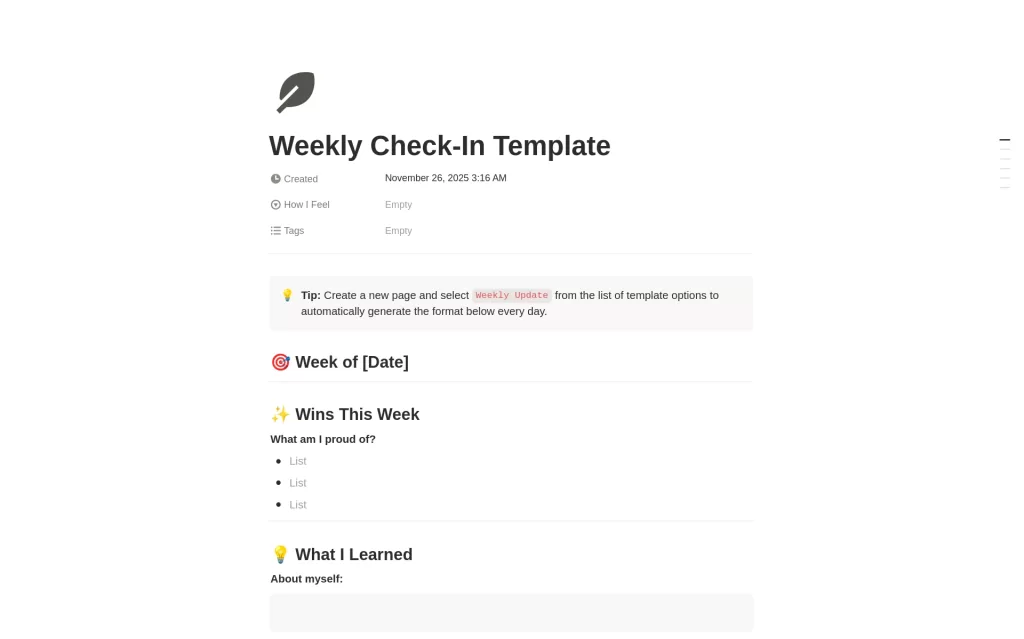
The Weekly Check-In
Every Sunday, there’s a separate template for weekly reflection. This is where you zoom out and look at patterns: What were your wins? What did you learn about yourself and about life? What patterns do you notice? What do you want to shift?
Weekly reflections prevent you from getting lost in the day-to-day and help you stay connected to your bigger picture.
Organized Views
The template includes five different ways to view your entries:
- All entries for the complete picture
- Calendar view to see your journaling consistency over time
- Daily entries filtered to show your regular practice
- Personal entries for more intimate reflections
- This Week showing just your last seven days

These views make it easy to navigate your journal and find exactly what you’re looking for.
You can get the Daily Reflection Journal template free here and duplicate it to your workspace.
Building Your Own Notion Journal Template vs. Using a Pre-Built One
Here’s something I tell everyone who asks about Notion journaling: there’s no right answer to whether you should build your own Notion journal template from scratch or use a pre-made one.
Build your own if:
- You have specific needs that generic templates don’t meet
- You enjoy the process of designing your own system
- You want complete control over every property and view
- You’re familiar with Notion databases and enjoy customization
Start with a template if:
- You want to begin journaling immediately without setup time
- You’re new to Notion and want to see how databases work
- You need inspiration for what’s possible
- You can always customize it later as you learn what you actually need
Most people I work with do a hybrid approach. They start with a template to understand the structure, journal for a few weeks, notice what they use and what they ignore, and then customize from there.
The Daily Reflection Journal works well as this kind of starting point because it has enough structure to be useful but enough simplicity to customize easily.
Want More Depth? The Mindful Reflection Journal
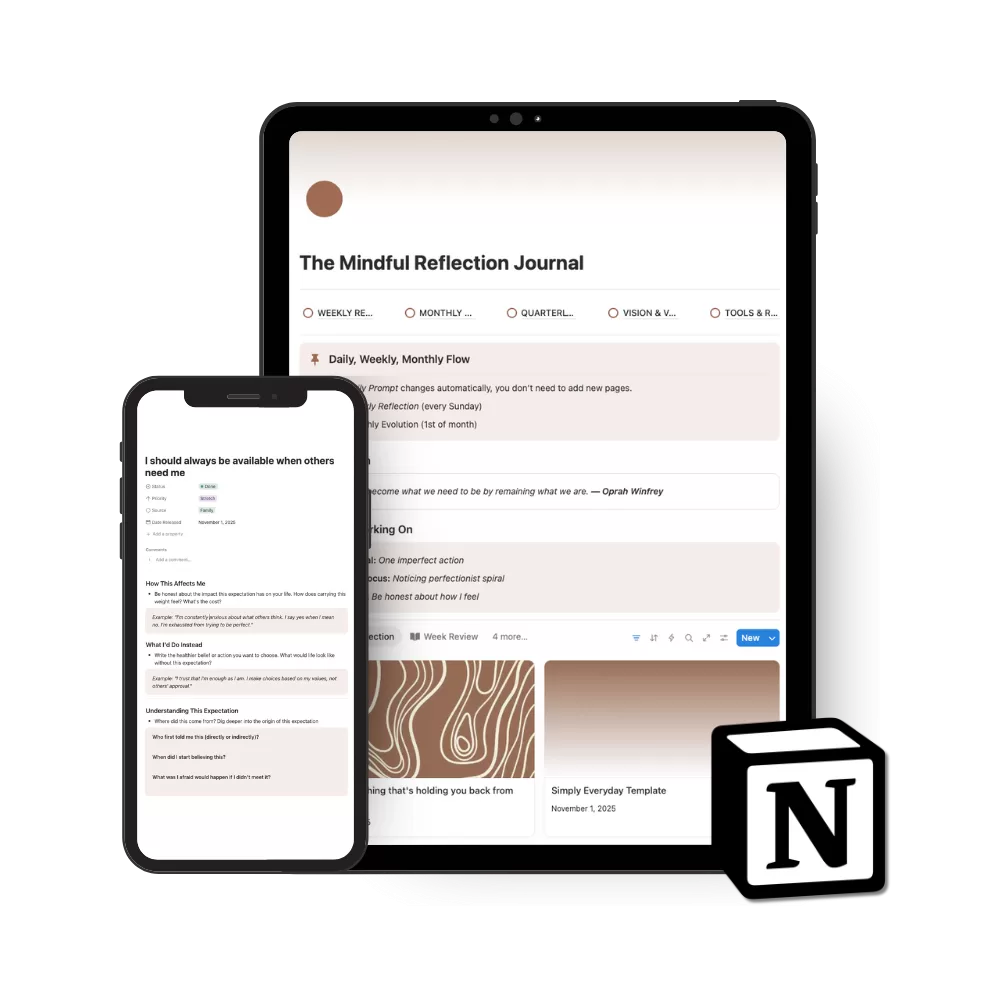
If you find yourself loving the structured journaling approach and wanting to go deeper, I built something specifically for that: The Mindful Reflection Journal.
It takes everything in the free template and amplifies it with 365 rotating daily prompts (so you never see the same question too often), integrated weekly reflections, monthly evolution tracking, and quarterly transformation reviews. The whole system is automated, so you can focus on the actual writing instead of managing your journaling setup.
It’s designed for women who are serious about self-discovery and want a practice that grows with them. But start with the free version first. See if structured digital journaling resonates with you before investing in the full system.
Your Notion Journal Template, Your Way
Here’s what I want you to take away from all of this: your journaling practice should serve you, not the other way around.
Whether you use the 30 prompts above by randomly selecting one each day, incorporate them into a custom Notion journal template, use the Daily Reflection Journal as your foundation, or build something entirely different, what matters is that you show up honestly on the page.
Some days that means three sentences. Some days it means pages of processing. Both count. Both matter.
The beauty of Notion is that it meets you wherever you are and travels with you wherever you go. No more abandoned journals in different cities. No more “I forgot it at home.”
Your journal is always with you, waiting for whatever you need to say.
Ready to start? Get the free Daily Reflection Journal template and begin your practice today.












0 Comments